01
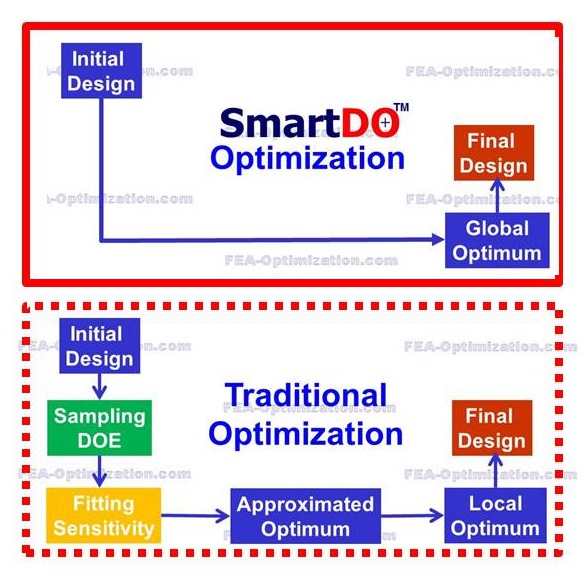
Direct Global Search
Searches beyond a nearby local optimum using adaptive search direction, step control, tunneling and hill-climbing strategies.


An engineering optimization environment for automating CAD, CAE, FEA, CFD and multiphysics design loops. SmartDO connects simulation parameters, executes iterative analyses, evaluates objectives and constraints, and searches for improved feasible designs.
SmartDO is structured around solver orchestration, parameter exchange, design-space exploration and automatic handling of failed or infeasible analyses.
Searches beyond a nearby local optimum using adaptive search direction, step control, tunneling and hill-climbing strategies.
Efficient constrained nonlinear optimization for continuous and differentiable engineering responses.
Population-based search for discrete, mixed-variable, discontinuous or highly nonlinear design spaces.
Evaluates competing objectives through Pareto-based methods to identify balanced engineering trade-offs.
Detects failed CAD or CAE evaluations, non-convergence and invalid output, then adapts the optimization process.
Supports scripted workflow customization using Tcl/Tk and Python for internal tools, custom solvers and automated engineering processes.
The optimization loop connects model parameters, simulation execution, result extraction and solver decisions into one repeatable process.
Assign geometry, material, process and operating parameters as design variables.
Define targets such as minimum mass, pressure loss, stress, temperature or cost.
Specify allowable limits for strength, displacement, temperature, flow and geometry.
Automatically update the model, run the connected solver and extract response data.
Use the optimization algorithm to create the next candidate until convergence.
Different engineering problems require different optimization methods. SmartDO can apply gradient-driven search, robust genetic search or hybrid workflows.
The optimization engine is designed to operate in noisy, constrained and high-dimensional CAE environments.
The platform can coordinate parameters and responses across individual physics solvers or tightly coupled simulation workflows.
Integration can be configured through graphical links or programmable interfaces, depending on the solver and automation requirement.
| Layer | Technical Function | Typical Data Exchange | Implementation Method |
|---|---|---|---|
| CAD / Geometry | Modify dimensions, shapes and topology controls | Dimensions, feature values, geometry parameters | SmartLink, scripting, file or API-based exchange |
| CAE Pre-processing | Update materials, mesh, loads and boundary conditions | Mesh controls, load cases, material properties | Solver commands, templates or automation scripts |
| Solver Execution | Launch structural, CFD, thermal or coupled simulations | Input decks, command parameters, job status | Batch execution, external process control |
| Post-processing | Extract objective and constraint responses | Stress, displacement, temperature, flow and frequency | Result readers, reports, text or database parsing |
| Optimization Core | Evaluate feasibility and generate the next design | Design vectors, objective values, constraints | Gradient, genetic, hybrid and multi-objective methods |
A reliable workflow requires stable CAD regeneration, repeatable meshing, validated boundary conditions, clearly defined objectives and measurable engineering constraints. Computational demand increaseswith the number of variables, physics domains and solver evaluations.
Here are what SmartDO offers, based on the latest sources:
| Optimization methods | |
Supports a combination of methods: Gradient-based nonlinear programming; Genetic Algorithms (Robust GA); plus hybrid/combined approaches.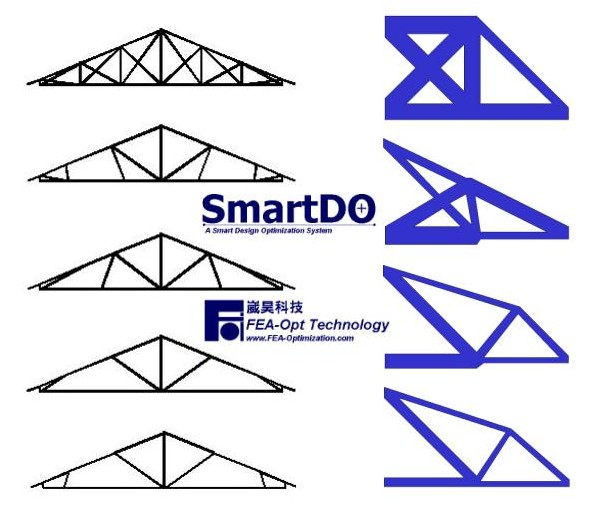 |
| Direct Global Search |
| GUI + Scripting |
| Has both a GUI (“SmartLink”, “one-page setup”) and scripting capability (Tcl/Tk, and increasingly Python) for customizing workflows. |
| Multi-objective optimization |
| Supports synchronous / advancing Pareto optimal methods so that multiple objective functions can be improved simultaneously. |
| Integration with CAD/CAE tools |
| SmartLink allows linking with commercial CAE tools (ANSYS, etc.), also with open-source tools (FreeCAD, CalculiX, etc.) via its “OpenXim” platform. |


| Automation & push-button workflows | After setup, optimizations can be triggered with minimal manual intervention. Emphasis is on “push-button automatic design optimization”. |
If you're considering using SmartDO, here are things to check:
CA Example Support: What CAE tools you use now (ANSYS, Abaqus, OpenFOAM, etc.), and whether SmartLink supports them out-of-the-box. If not, whether writing custom links (via scripting) is feasible.
Compute Resources: Do you have sufficient HPC or multi-core / cluster resources? Because optimization (especially with many variables/physics) can require many CAE runs.
Model Quality: The better the CAE model (mesh, boundary conditions, etc.), the more reliable the results will be. Also, setting good constraints/objectives is crucial.
Licensing & Cost: Proprietary tools often have recurring licensing or support costs; need to estimate TCO.
Team Skillset: If you or your team are comfortable with scripting, handling multiphysics, etc., you can leverage more of the tool; otherwise, you may use it more in its GUI mode.
Contact us for software demonstrations, technical discussions, quotations and engineering solutions.