
Comparing Solid Edge Foundation, Classic and Premium: Which Package Is Right for You?
Siemens Solid Edge is available in different package levels to match different engineering requirements. Foundation provides a strong professional mechanical CAD environment, Classic expands the platform with advanced design and productivity capabilities, while Premium extends Solid Edge into advanced simulation and multidisciplinary mechanical-electrical product development.
Choosing a CAD system is not only about selecting the software platform. Companies also need to determine exactly which capabilities their engineers require today and what they may need as products become more complex.
This is where the different Solid Edge packages become important.
Instead of providing every company with the same configuration, Siemens offers different Solid Edge product tiers. This allows engineering companies to select a package that better matches their product complexity, engineering workflow and digital transformation goals.
Three important configurations for professional engineering teams are:
- Solid Edge Foundation
- Solid Edge Classic
- Solid Edge Premium
But what exactly is the difference between them? More importantly, which Solid Edge package should your company choose?
Solid Edge: A Scalable 3D CAD Platform
Solid Edge is a professional product development platform from Siemens that combines parametric modelling with its well-known Synchronous Technology.
Synchronous Technology gives designers the flexibility of direct modelling while retaining dimensional and parametric control. This can be particularly useful when engineers need to make rapid design changes or work with imported CAD geometry.
Across the main Solid Edge packages, engineers can access core capabilities such as:
- 3D part modelling
- Assembly design
- 2D drafting
- Synchronous Technology
- CAD data import and export
- Mesh modelling
- Visualization
- Data management capabilities
- Additive manufacturing preparation
- Basic motion capabilities
Solid Edge Foundation
Solid Edge Foundation is a comprehensive professional 3D CAD package intended for companies that need strong mechanical design capabilities without requiring all of the specialised tools included in the higher tiers.
It is particularly suitable for mechanical product development, machinery design, fabrication, sheet metal products and general engineering applications.
Key Capabilities of Solid Edge Foundation
- Advanced part modelling
- Assembly design
- 2D drafting
- Synchronous Technology
- Sheet metal design
- Frame design
- Weldment design
- Surface modelling
- Basic part simulation
- Design configuration tools
- CAD migration tools
- 2.5-axis milling capability under applicable licensing/maintenance conditions
Who Should Choose Foundation?
Solid Edge Foundation can be a strong choice for companies primarily focused on mechanical product design and manufacturing documentation.
Typical users can include:
- Machine builders
- Industrial equipment manufacturers
- Sheet metal manufacturers
- Fabrication companies
- Fixture designers
- Product design companies
- Small and medium-sized manufacturing businesses
Solid Edge Classic
Solid Edge Classic includes the capabilities of Foundation and adds several advanced engineering and productivity tools.
This package is well suited to engineering departments that need more than conventional mechanical CAD and want capabilities for reverse engineering, generative design, advanced visualization and component standardisation.
Classic Adds Capabilities Such As
- Subdivision modelling
- Photorealistic rendering
- Standard parts libraries
- Vendor catalogue integration
- Reverse engineering
- Dynamic visualization
- Engineering reference tools
- CAD Direct capabilities
- Design-for-cost functionality
- Generative design
- Additional productivity and intelligent design tools
Why Standard Parts Matter
Machinery and equipment manufacturers frequently use hundreds or thousands of standard components such as bolts, nuts, bearings and other purchased parts.
Having access to standard parts and supplier catalogue information can reduce the need to manually model commonly used components.
This becomes increasingly valuable as assemblies become larger and more complex.
Reverse Engineering
Reverse engineering capabilities can be particularly valuable for organisations working with scanned components, legacy products or physical components for which original CAD data is unavailable.
This makes Solid Edge Classic attractive to companies involved in:
- Product redesign
- Legacy component development
- 3D scanning workflows
- Aftermarket engineering
- Tooling development
- Design modification of existing components
Generative Design
Generative design allows engineers to explore geometry based on engineering requirements and design constraints.
Rather than relying only on conventional feature-by-feature modelling, generative techniques can help engineers investigate alternative structures with objectives such as material reduction and efficient load paths.
Who Should Choose Solid Edge Classic?
Classic is a good fit for organisations requiring a broader mechanical product development environment.
- Machine manufacturers
- Automation equipment builders
- Special-purpose machine companies
- Automotive component manufacturers
- Product development companies
- Engineering consultancies
- Companies using reverse engineering
- Businesses requiring advanced visualization
Solid Edge Premium
Solid Edge Premium builds on Solid Edge Classic and extends the environment into more advanced engineering analysis and multidisciplinary product development.
It is designed for organisations that want engineers to do more than create mechanical geometry. Premium adds capabilities that can help evaluate product behaviour and develop mechanical systems containing electrical and electronic elements.
Premium Adds Capabilities Including
- Advanced stress simulation
- Advanced motion simulation
- Simulation optimization
- Electrical routing
- PCB collaboration
- Pipe and tube design
- Point cloud visualization
Advanced Simulation
One of the major differences between Classic and Premium is the additional simulation capability available with Premium.
Instead of waiting until physical prototypes are manufactured, engineers can use digital simulation to investigate aspects of product behaviour earlier in the development process.
This can help answer questions such as:
- Is the component strong enough?
- Where are critical stress regions?
- How will an assembly behave under loading?
- How will mechanisms move?
- Can the design be improved before manufacturing?
Electrical Routing
Modern machines increasingly combine mechanical structures with motors, sensors, control systems and electrical connections.
Electrical routing capabilities can help engineers plan wiring and related routing within the mechanical product environment, supporting improved coordination between mechanical and electrical development.
PCB Collaboration
Products containing electronic hardware often require close coordination between mechanical CAD and PCB development.
PCB collaboration helps mechanical and electronic teams evaluate relationships between enclosures, boards and surrounding product geometry earlier in development.
Pipe and Tube Design
For companies designing machinery containing hydraulic, pneumatic or process systems, pipe and tube design capabilities can become particularly important.
This makes Premium attractive for industrial machinery and equipment where mechanical design must be coordinated with routed systems.
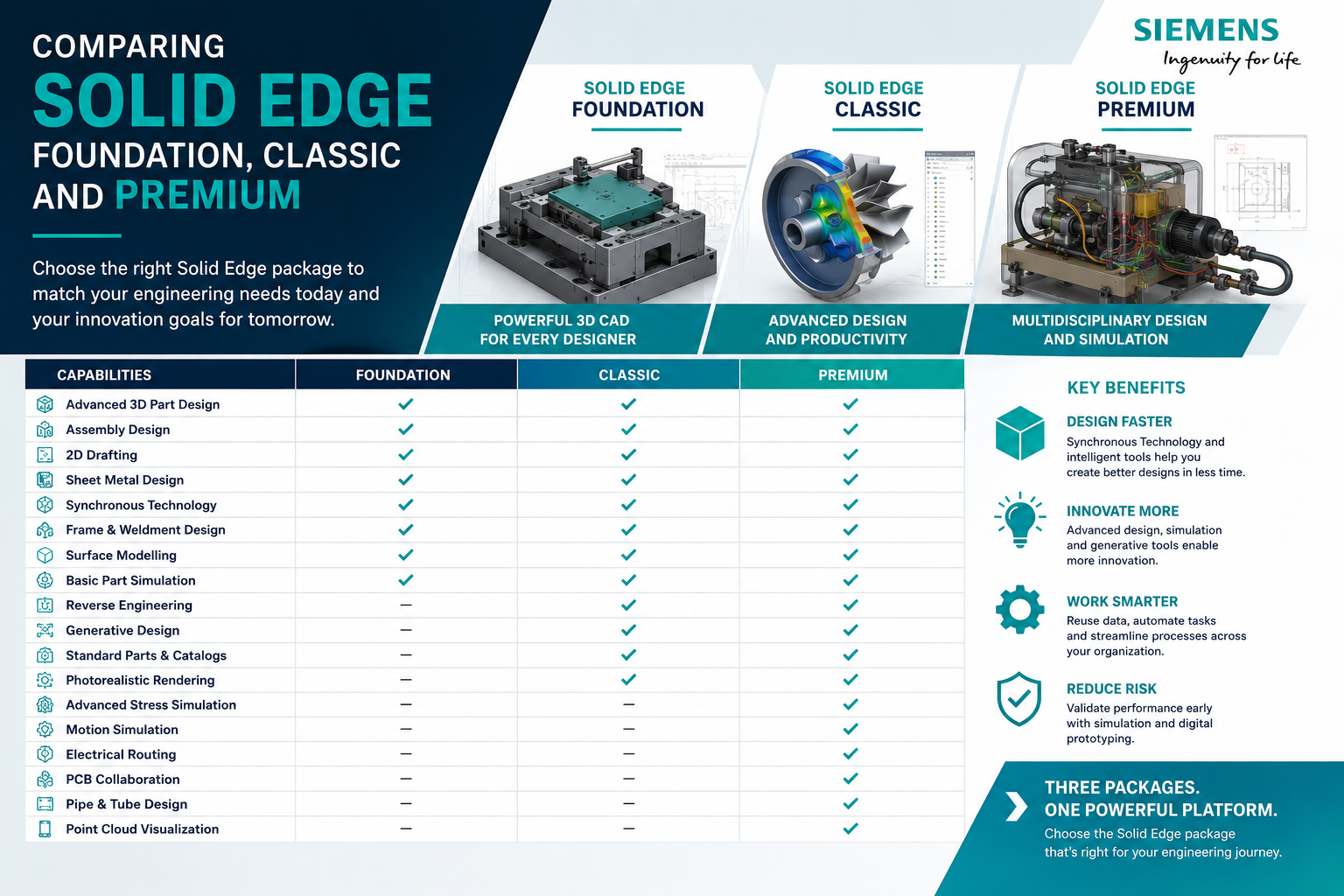
Solid Edge Foundation vs Classic vs Premium
| Capability | Foundation | Classic | Premium |
|---|---|---|---|
| 3D Part Design | ✓ | ✓ | ✓ |
| Assembly Design | ✓ | ✓ | ✓ |
| 2D Drafting | ✓ | ✓ | ✓ |
| Synchronous Technology | ✓ | ✓ | ✓ |
| Sheet Metal | ✓ | ✓ | ✓ |
| Frame & Weldments | ✓ | ✓ | ✓ |
| Surface Modelling | ✓ | ✓ | ✓ |
| Part Simulation | ✓ | ✓ | ✓ |
| Reverse Engineering | — | ✓ | ✓ |
| Standard Parts Library | — | ✓ | ✓ |
| Photorealistic Rendering | — | ✓ | ✓ |
| Generative Design | — | ✓ | ✓ |
| CAD Direct | — | ✓ | ✓ |
| Advanced Stress Simulation | — | — | ✓ |
| Advanced Motion Simulation | — | — | ✓ |
| Simulation Optimization | — | — | ✓ |
| Electrical Routing | — | — | ✓ |
| PCB Collaboration | — | — | ✓ |
| Pipe & Tube Design | — | — | ✓ |
| Point Cloud Visualization | — | — | ✓ |
Quick Comparison of the Three Packages
Professional mechanical CAD and general product development.
- 3D CAD
- Assemblies
- Drafting
- Sheet metal
- Frames
- Surfacing
- Basic simulation
Advanced mechanical design and engineering productivity.
- Everything in Foundation
- Reverse engineering
- Standard parts
- Generative design
- Advanced surfacing
- Rendering
- CAD Direct
Advanced engineering and multidisciplinary product development.
- Everything in Classic
- Advanced simulation
- Motion simulation
- Electrical routing
- PCB collaboration
- Pipe & tube design
- Point clouds
Which Solid Edge Package Should You Choose?
Choose Foundation if your primary requirement is professional mechanical CAD, sheet metal, frames, weldments, assemblies, drawings and general product design.
Choose Classic if you need everything in Foundation plus reverse engineering, generative design, standard parts, advanced visualization, rendering and additional engineering productivity capabilities.
Choose Premium if your products require advanced simulation, mechanism analysis, electrical routing, PCB collaboration, pipe/tube design or broader multidisciplinary engineering capabilities.
Choosing Based on Industry
| Industry / Application | Suggested Starting Package | Reason |
|---|---|---|
| General Product Design | Foundation | Strong mechanical CAD capabilities |
| Sheet Metal Fabrication | Foundation | Sheet metal, assemblies and drawings |
| Machine Design | Classic | Standard parts and broader engineering tools |
| Special Purpose Machines | Classic / Premium | Depends on simulation and routing requirements |
| Reverse Engineering | Classic | Reverse engineering capabilities |
| Complex Machinery | Premium | Simulation, routing and multidisciplinary design |
| Electromechanical Products | Premium | PCB collaboration and electrical routing |
| Hydraulic / Pneumatic Equipment | Premium | Pipe and tube design capability |
Don't Select CAD Software Based Only on Price
The lowest-cost package is not automatically the most economical option.
For example, a machine builder may initially select Foundation because the core CAD capabilities satisfy most design requirements. However, if engineers repeatedly spend time manually creating standard components or need reverse engineering capabilities, Classic may deliver better overall productivity.
Similarly, purchasing Premium for a design team that only creates relatively simple mechanical parts may provide capabilities that are rarely used.
Evaluate the type of products you design, assembly complexity, simulation requirements, reverse engineering needs, electrical integration and future engineering roadmap before selecting a package.
Think About Future Engineering Requirements
CAD software is generally a long-term engineering platform rather than a short-term purchase.
A company that currently designs basic mechanical products may later introduce:
- More complex assemblies
- Sheet metal products
- Reverse engineering
- Generative design
- Design simulation
- Electrical systems
- Electronic components
- Hydraulic or pneumatic routing
Choosing a scalable CAD environment allows engineering capabilities to grow as the organisation's products and processes evolve.
Frequently Asked Questions
What is the main difference between Solid Edge Foundation and Classic?
Foundation focuses on comprehensive professional mechanical CAD capabilities, including sheet metal, frames, surfacing and part simulation. Classic adds advanced capabilities such as reverse engineering, generative design, standard parts, photorealistic rendering, CAD Direct and additional productivity tools.
What does Solid Edge Premium add over Classic?
Premium adds advanced stress and motion simulation, simulation optimization, electrical routing, PCB collaboration, pipe and tube design and point cloud visualization.
Is Solid Edge Foundation suitable for machine design?
Yes. Foundation provides professional part, assembly, sheet metal, frame, weldment and drawing capabilities. Companies requiring standard component libraries and additional advanced productivity features may benefit from Classic.
Which Solid Edge package is suitable for reverse engineering?
Solid Edge Classic and Premium include reverse engineering capabilities, making them better suited to workflows involving scanned or existing physical components.
Which Solid Edge package is best for simulation?
Foundation includes basic part simulation capabilities, while Premium is the stronger option for organisations requiring advanced stress simulation, assembly-level analysis, advanced motion and simulation optimization.
Which Solid Edge package is best for electromechanical design?
Premium is generally the most appropriate of these three packages when electrical routing and PCB collaboration are important parts of the product development workflow.
Conclusion
There is no single Solid Edge configuration that is automatically right for every engineering organisation.
Solid Edge Foundation provides a strong professional mechanical CAD environment for product, machine, sheet metal and fabrication design.
Solid Edge Classic expands this environment with capabilities such as reverse engineering, standard parts, generative design, visualization and other advanced productivity tools.
Solid Edge Premium extends the platform further with advanced simulation, electrical routing, PCB collaboration, pipe and tube design and other multidisciplinary engineering capabilities.
The right choice should therefore be based on your current engineering workflow, product complexity and expected future requirements rather than package price alone.
Not Sure Which Solid Edge Package Is Right for Your Business?
Rheologist Gaze & Solutions can help you evaluate your design workflow and select the appropriate Siemens Solid Edge configuration for your engineering requirements.
Whether you require Solid Edge Foundation, Classic or Premium, our team can help you understand the capabilities, licensing options, implementation and training requirements.
Talk to Our Solid Edge Team