
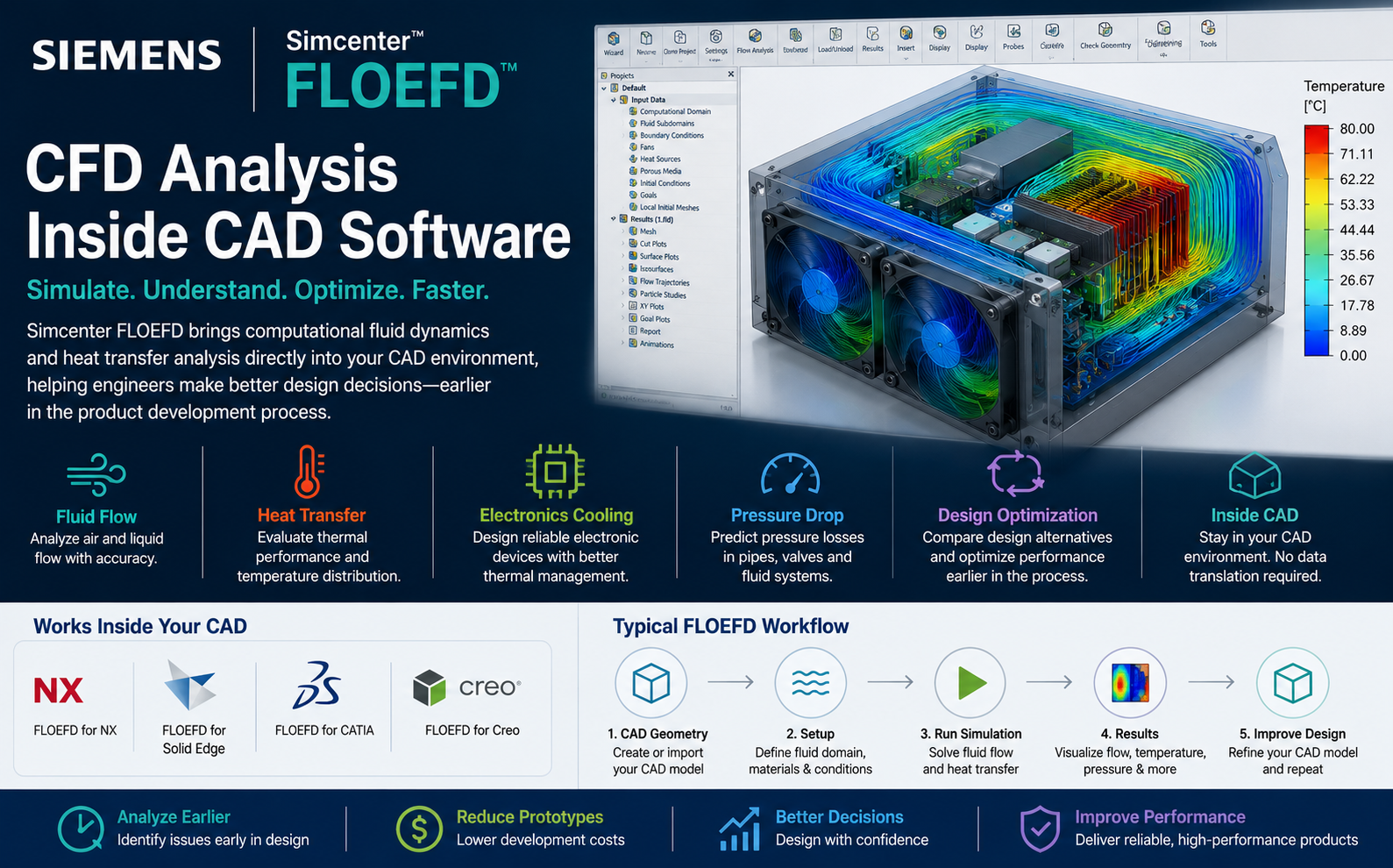
Simcenter FLOEFD: CFD Analysis Inside CAD Software
Analyse fluid flow, pressure, heat transfer and thermal performance earlier in product development without disconnecting simulation from your CAD design workflow.
Siemens positions Simcenter FLOEFD as CAD-embedded CFD software designed to frontload fluid-flow and heat-transfer analysis earlier in the engineering process.
What Is Simcenter FLOEFD?
Simcenter FLOEFD is Computational Fluid Dynamics software within the Siemens Simcenter portfolio.
It is designed around a CAD-embedded workflow that allows engineers to evaluate fluid-flow and thermal behaviour while remaining closely connected to their product geometry.
Instead of designing the product first and sending it to another department for CFD analysis later, engineers can use FLOEFD to evaluate fluid and thermal performance much earlier during product development.
What Is CFD Analysis?
Computational Fluid Dynamics (CFD) uses numerical methods to predict how liquids, gases and heat behave within and around a product.
CFD can help engineers understand parameters such as:
- Velocity
- Pressure
- Temperature
- Mass flow rate
- Pressure drop
- Heat transfer
- Airflow distribution
- Thermal gradients
- Flow recirculation
- Cooling performance
Traditional CFD Workflow vs CAD-Embedded CFD
| Activity | Traditional CFD Workflow | Simcenter FLOEFD Workflow |
|---|---|---|
| CAD Geometry | Created in CAD | Created in CAD |
| Geometry Transfer | Often exported to CFD software | Analysis remains closely integrated with CAD |
| Geometry Preparation | Often repeated in CAE environment | Reduced separation from design geometry |
| Design Changes | May require repeated transfer | Better connected to CAD revisions |
| Who Can Use CFD? | Often specialist analysts | Designed to make CFD more accessible to design engineers |
| Simulation Timing | Often later in development | Can be frontloaded earlier |
How Does CFD Inside CAD Work?
Create the CAD Design
Develop the product geometry within the normal CAD design environment.
Define the Physics
Specify fluids, materials, temperatures, pressures, flow rates and other relevant boundary conditions.
Run CFD Analysis
Calculate fluid-flow and thermal behaviour for the current product design.
Improve the Design
Modify the CAD geometry and compare alternatives using simulation results.
Why Is CAD-Embedded CFD Important?
Analyse Earlier
Evaluate fluid and thermal performance before the product design is fully frozen.
Evaluate More Design Variants
Modify geometry and compare alternative concepts earlier in the design cycle.
Stay Connected to CAD
Reduce the disconnect that can occur between CAD design and standalone simulation workflows.
Simulation-Driven Design
Use engineering simulation to influence geometry rather than only checking the final design.
Reduce Physical Prototypes
Digital analysis can help identify design problems before investing in prototype manufacturing and testing.
Improve Design Confidence
Understand performance earlier before committing to downstream manufacturing decisions.
What Can Simcenter FLOEFD Analyse?
Fluid Flow Analysis Inside the CAD Environment
Many products contain internal passages where fluid distribution directly affects performance.
Examples include:
- Valves
- Manifolds
- Pumps
- Air ducts
- Cooling channels
- Heat exchangers
- HVAC components
- Electronic enclosures
- Industrial equipment
FLOEFD allows engineers to visualize velocity, pressure and flow distribution and then evaluate how design changes influence performance.
Heat Transfer and Thermal Simulation
Thermal performance is one of the most important engineering considerations in modern product development.
Too much heat can reduce:
- Product reliability
- Electronic component life
- Mechanical performance
- User comfort
- Energy efficiency
Simcenter FLOEFD can help engineers evaluate temperature distribution and heat-transfer behaviour while the product is still being designed.
Electronics Cooling Simulation
Electronics are becoming smaller and more powerful, creating increasing thermal-management challenges.
FLOEFD can be used to investigate:
PCB Cooling
Evaluate temperature and airflow behaviour around printed circuit boards.
Heat Sinks
Compare heat-sink geometry and thermal-management concepts.
Fans
Analyse forced-air cooling and airflow distribution.
Electronic Enclosures
Understand hot spots and airflow pathways inside enclosures.
Components
Evaluate how power-generating components affect system temperature.
Thermal Design
Use simulation results to improve cooling concepts earlier.
Pressure Drop Analysis
Pressure losses affect the performance and energy efficiency of many fluid systems.
CFD can help identify where pressure is being lost due to:
- Sudden geometry changes
- Bends
- Restrictions
- Small flow passages
- Valves
- Filters
- Surface effects
Engineers can modify the CAD design and compare how different geometries influence pressure drop.
Use CFD to Compare Design Alternatives
One of the strongest advantages of performing CFD earlier is that simulation can become part of the actual design process.
Instead of asking only:
“Does this design work?”
engineers can start asking:
Which CAD Platforms Can Use Simcenter FLOEFD?
Siemens provides CAD-embedded Simcenter FLOEFD workflows for major engineering CAD environments.
This allows product-development teams to introduce CFD while continuing to work in a familiar design environment.
Engineering Applications for Simcenter FLOEFD
Why Simcenter FLOEFD Is Useful for Design Engineers
Traditional high-end CFD tools are extremely powerful, but they are often primarily operated by dedicated simulation specialists.
CAD-embedded CFD takes a different approach.
It brings simulation closer to engineers who are making the geometry decisions.
This can improve communication between design and simulation teams and allow dedicated CAE specialists to focus on higher-complexity simulation problems.
Frontloading CFD Earlier in Product Development
The cost of correcting a design problem generally increases as a product moves further through development.
A thermal issue discovered during initial CAD design may require a simple geometry change.
The same issue identified after prototype manufacturing may require:
- New components
- Additional prototype builds
- Tooling changes
- Project delays
- Additional testing
This is why Siemens emphasizes frontloading simulation earlier in product development with Simcenter FLOEFD.
Simcenter FLOEFD Continues to Expand
Siemens continues to develop FLOEFD for broader fluid, thermal and electronics applications.
Recent releases have included continued enhancements around electronics thermal-analysis workflows, geometry handling, automation and semiconductor thermal modelling.
This makes CAD-embedded CFD increasingly relevant as thermal-management requirements become more important in products containing electronics, power systems and compact high-performance components.
Who Should Consider Simcenter FLOEFD?
Product Designers
Evaluate fluid and thermal performance while developing new product geometry.
Mechanical Engineers
Analyse pressure, flow distribution and heat-transfer behaviour.
Thermal Engineers
Investigate product cooling and temperature-management requirements.
Electronics Engineers
Evaluate thermal management in electronics and electrical products.
R&D Teams
Compare alternative design concepts before physical prototyping.
SME Manufacturers
Introduce CFD into product-development workflows without completely separating simulation from design.
Business Benefits of CFD Inside CAD
| Business Challenge | How CAD-Embedded CFD Can Help |
|---|---|
| Long product-development cycles | Evaluate performance earlier |
| Too many prototype iterations | Investigate designs digitally before physical testing |
| Design / CAE communication gap | Bring simulation closer to the CAD environment |
| Late thermal failures | Evaluate temperature and cooling during design |
| High pressure loss | Compare flow-passage alternatives digitally |
| Product cooling problems | Visualize airflow and heat transfer |
| Slow design optimization | Compare multiple CAD variants using CFD results |
Simcenter FLOEFD Support from Rheologist Gaze & Solutions
Rheologist Gaze & Solutions can support engineering organizations evaluating Simcenter FLOEFD for fluid-flow and thermal simulation.
We can help assess requirements around:
- CAD-embedded CFD
- Fluid-flow simulation
- Heat-transfer analysis
- Electronics cooling
- Pressure-drop analysis
- Internal and external flow
- Thermal-management applications
- Simcenter FLOEFD implementation
- Software demonstrations
- Training
- Technical support
Frequently Asked Questions About Simcenter FLOEFD
What is Simcenter FLOEFD?
Simcenter FLOEFD is Siemens CAD-embedded CFD software for analysing fluid-flow and heat-transfer behaviour earlier in the product design process.
What does CFD inside CAD mean?
It means engineers can perform fluid and thermal simulation while remaining closely connected to the CAD design environment instead of using an entirely disconnected simulation process.
Can FLOEFD perform heat-transfer analysis?
Yes. FLOEFD supports fluid-flow and heat-transfer analysis for a range of thermal-management applications.
Can Simcenter FLOEFD be used for electronics cooling?
Yes. Electronics thermal management is an important application area for Simcenter FLOEFD.
Can Simcenter FLOEFD analyse pressure drop?
Yes. CFD can be used to evaluate pressure distribution and pressure losses across flow passages and fluid-system components.
Which CAD software supports FLOEFD?
Siemens provides CAD-embedded FLOEFD workflows for NX, Solid Edge, Creo and CATIA.
Is Simcenter FLOEFD suitable for design engineers?
Yes. CAD-embedded CFD is specifically valuable for engineers who want to use simulation earlier while developing and modifying product geometry.
Conclusion: Bring CFD Closer to Product Design
Simulation delivers the greatest design value when engineers can use its results while there is still time to change the product.
Simcenter FLOEFD helps move CFD from a downstream verification activity toward an earlier simulation-driven design process.
By performing fluid-flow and heat-transfer analysis closer to the CAD environment, engineering teams can evaluate more concepts, identify problems earlier and make better-informed product-development decisions.
That is the core advantage of bringing CFD analysis inside the CAD workflow.
Want to Explore CFD Inside Your CAD Workflow?
Talk to Rheologist Gaze & Solutions about Siemens Simcenter FLOEFD for fluid flow, heat transfer, electronics cooling and CAD-embedded CFD simulation.
Request a Live Demonstration info@rgees.in +91 89394 50666SEO Focus Keywords: Simcenter FLOEFD, Siemens FLOEFD, CAD embedded CFD, CFD inside CAD, CFD software for designers, fluid flow simulation software, thermal simulation software, heat transfer analysis, electronics cooling simulation, FLOEFD for NX, FLOEFD for Solid Edge, FLOEFD for Creo, FLOEFD for CATIA, computational fluid dynamics software, CFD analysis software.